 Call (844) NO-DISPUTES
What is a Credit Card Authentication Code?
Known as a credit card authentication code, this number goes by several names depending on your card issuer: CVV, CVC, CID, and others. While the names can get confusing, the job is always the same - to verify that the person making a purchase actually has the physical card in hand.
Understanding how this code works, where to find it, and why it matters helps you make better decisions about your financial security. This post breaks it all down in plain language, so you walk away knowing what that little number is doing.
Where the Authentication Code Lives on Your Card
Most cards display their authentication code on the back. But not all do. The location can depend on your card network, and knowing where to look saves you time when you need to enter it.
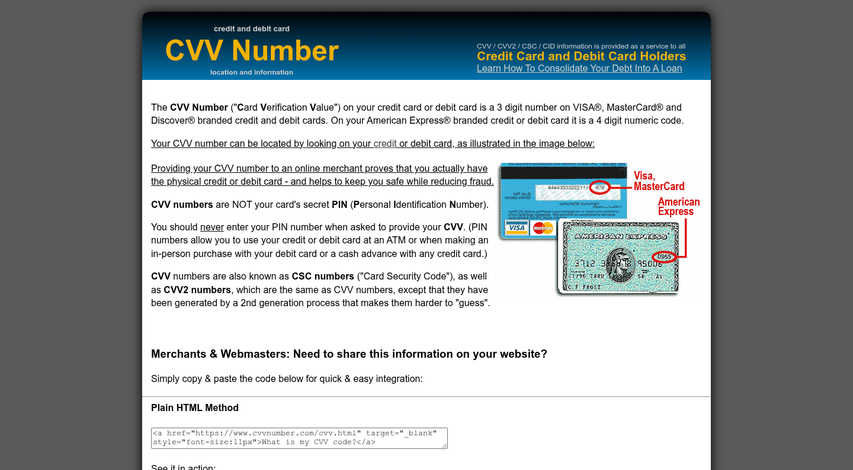
Visa, Mastercard and Discover all place a 3-digit code on the back of the card. You'll find it printed on or near the signature strip, usually to the right - it's separate from your card number and sits on its own.
American Express does things differently. Amex uses a 4-digit code and it lives on the front of the card above the card number, either on the left or right side depending on the card design. If you've ever grabbed an Amex and hunted around the back for a code, that's why you came up empty.
| Card Network | Number of Digits | Location |
|---|---|---|
| Visa | 3 | Back of card, near signature strip |
| Mastercard | 3 | Back of card, near signature strip |
| Discover | 3 | Back of card, near signature strip |
| American Express | 4 | Front of card, above the card number |
The code is always printed directly on the card instead of embossed like the card number; it's intentional - it makes the code harder to copy from an imprint.
One thing worth knowing is that the code is never stored on the magnetic stripe. So even if someone skims your card at a compromised terminal, they can't pull the code from that data alone. The physical card is the only place it lives. Understanding how card data is protected matters especially for recurring charges that rely on network tokenization.
How Banks Actually Generate Your CVV
Your CVV isn't a random number somebody picked. Banks generate it using a formula that ties the code directly to your account.
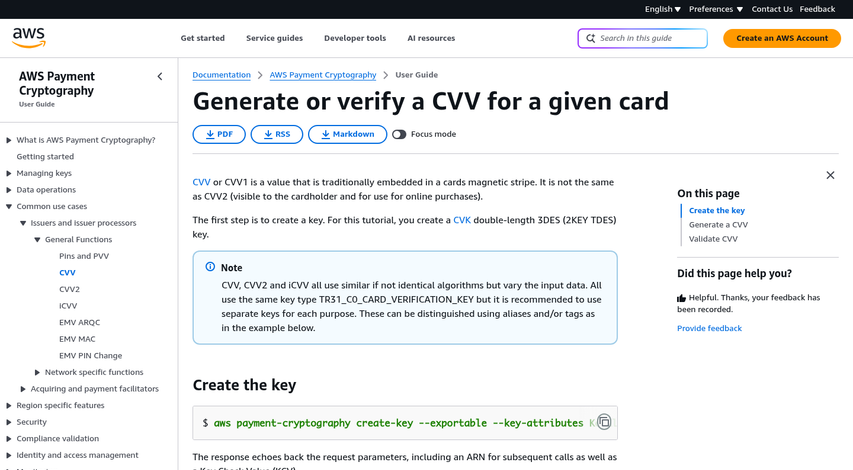
The inputs to that formula are your account number, your card's expiration date, a short service code, and a pair of secret encryption keys held by the bank. Feed those ingredients into the algorithm and out comes your three or four digit authentication code. Change any single input - even by one digit - and the result is a different number.
That's why the code is so hard to guess. There are only 1,000 possible three-digit combinations, which sounds easy to crack. But finding the right combination for your account means knowing the bank's private encryption keys. Those keys never leave the bank's protected systems, so an attacker would need access to something they can't get to.
Reverse-engineering the formula is equally tough. The algorithm banks use is a version of DES (Data Encryption Standard) cryptography, designed to be a one-way process. You can run it forward to generate the CVV. But working backward from the output to find the keys is computationally not feasible with current technology.
This is also why your CVV isn't stored in the magnetic stripe or chip on your card - it's calculated from data that is. When a payment processor wants to verify your code, they run the same algorithm with the same inputs and check if the result matches what you entered. No stored CVV means no CVV to steal from a card reader.
One detail that matters: your CVV is tied to your card's expiration date. When your bank reissues your card with a new expiration, the CVV changes too. The account number might stay the same. But a different expiration date produces a different code; it's the formula doing what it's designed for.
How Authentication Codes Protect Against Card-Not-Present Fraud
Because CVVs are generated separately from your card number and never stored in the same place, they do work with these fraud prevention measures. That separation is what makes them helpful in online transactions where no one can physically look at your card.
Card-not-present fraud accounts for 73% of all U.S. card payment fraud, and widespread ecommerce fraud reached an estimated $44.3 billion in 2024. Those numbers reflect a simple reality: stealing a card number has become far easier than stealing a physical card, so online checkouts are where most fraud happens.
A CVV fills a gap. When you shop in person, a merchant can swipe or tap your card and verify it's physically present. Online, that's not possible. Asking for a CVV at checkout is the closest thing to saying "prove you have the actual card in front of you."
A stolen card number alone won't get a fraudster very far if the checkout screen asks for a CVV. Data breaches can expose millions of card numbers at once. But those databases usually don't include CVVs alongside them; it's not an accident - it's a direct result of laws that restrict merchants from storing CVVs after a transaction is processed.
So even when a card number leaks, the authentication code stays out of reach. A fraudster working from a stolen list of numbers still hits a wall at checkout because the CVV was never part of what got stolen. This is also how BIN attacks differ - attackers there are testing card numbers in bulk, often without having full cardholder details.
This is also why phishing attacks go after CVVs so aggressively. Scammers know that a card number without the code has limited value for online purchases. A stolen card number can become usable for card-not-present transactions only when a victim hands over both pieces of information.
The CVV doesn't make fraud impossible. But it raises the bar in a meaningful way for online purchases. Merchants who want additional layers of protection can also look at tools like Strong Customer Authentication, which adds verification steps beyond just a code.
What Merchants Can and Cannot Store After a Transaction
There are strict rules about what can be done with your card data after a purchase goes through. The Payment Card Industry Security Standards Council, which sets the data security standards that merchants have to follow, classifies the CVV as sensitive authentication data. That means merchants are not allowed to store it after a transaction is authorized - not in a database, not in a log file, not anywhere.
This rule exists for a helpful reason. If a merchant's database gets breached, the damage is limited by what was actually stored there. A thief who walks away with card numbers and expiration dates still can't complete most online purchases without the CVV.
Here is a quick overview of what merchants can and can't keep on file.
| Data Type | Can Merchants Store It? |
|---|---|
| Cardholder name | Yes |
| Card number (PAN) | Yes, if properly encrypted |
| Expiration date | Yes |
| CVV / CVC / authentication code | No - must be deleted after authorization |
| Full magnetic stripe data | No |
| PIN or PIN block | No |
But not every merchant follows these rules as strictly as they should. Some smaller or older systems were not built with these standards in mind, and sensitive data can be retained in places like transaction logs or backup files without anyone realizing it.
When that happens, a data breach can become far more damaging than it needed to be. Cardholders can be exposed through stolen card numbers and the full set of details needed to use those cards fraudulently online.
When an Authentication Code Alone Isn't Enough
Merchant storage laws help protect your code after a transaction. But they can't protect you from a person who tricks you into sharing it yourself. Phishing emails, fake customer service calls, and fraudulent websites are all designed to get you to hand over your card details willingly. No storage policy in the world stops that.
A helpful rule worth remembering: legitimate banks and payment processors will never ask for your CVV over the phone or by email. If someone contacts you and asks for it, that's a red flag. You can always hang up and call the number on the back of your card to verify.
Card skimming is another gap in CVV protection. Physical skimming devices attached to ATMs or payment terminals can capture your card number and other data from the magnetic stripe. Some more advanced setups also capture the CVV. Chip cards cut back on this danger. But they don't remove it in every situation.
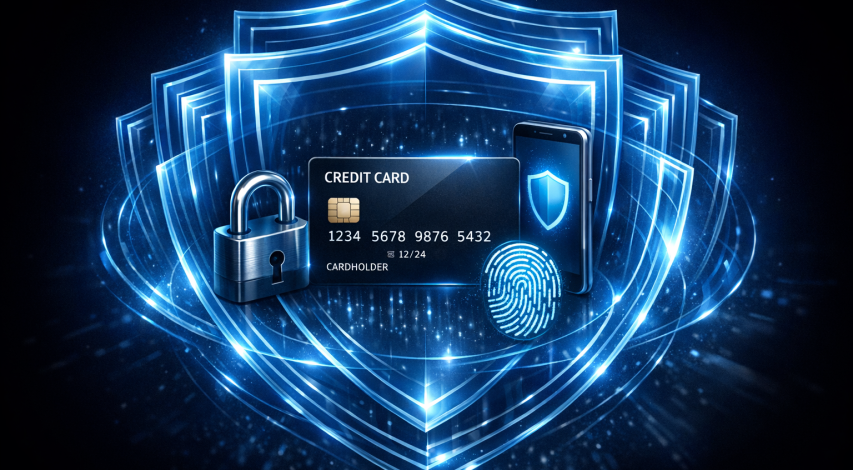
Authentication codes are just one layer in a much wider system. Two-factor authentication can add a second checkpoint by sending a one-time code to your phone before a transaction goes through. Virtual card numbers let you generate a temporary card number for online purchases so your details stay private. Transaction alerts notify you the second your card is used so you can act fast if something looks wrong.
Using these tools together makes a difference. A CVV confirms that you physically have the card. But it can't double-check that you are the one using it; that's where the other layers come in.
Understanding how these systems work puts you in a much better position than relying on any single protection. Scammers adapt, and the best response is to know what your card's security features actually do - and what they were never designed to manage on their own. If you suspect unauthorized activity, it helps to understand what qualifies as a fraudulent transaction and how to respond quickly.
Keep That Little Code Close - and Your Guard Closer
Putting that knowledge to work does not have to be tough. A few easy habits go a long way:
- Review your statements regularly so unfamiliar charges don't go unnoticed.
- Use virtual card numbers for online shopping where your bank or card issuer offers them - they keep your real CVV out of circulation.
- Never share your CVV unless you personally initiated the transaction and you're certain the site or service is legitimate.
Financial security doesn't depend on one big choice. Rather, it's built from small, steady habits - like understanding what that three- or four-digit code actually does and treating it accordingly. The more familiar you are with how your card protects you, the better positioned you are to protect yourself.
FAQs
What is a credit card authentication code?
A credit card authentication code (CVV, CVC, or CID) is a short number printed on your card that verifies you physically have the card during a purchase, particularly for online transactions.
Where is the CVV located on my card?
Visa, Mastercard, and Discover place a 3-digit code on the back near the signature strip. American Express uses a 4-digit code located on the front of the card above the card number.
Can merchants store my CVV after a transaction?
No. PCI security standards prohibit merchants from storing CVVs after a transaction is authorized. This limits fraud damage if a merchant's database is ever breached.
How does a CVV protect against online fraud?
Since CVVs aren't stored in breached databases, stolen card numbers alone are useless at checkout. Requiring a CVV forces fraudsters to physically possess your card to complete online purchases.
Is a CVV enough to fully protect my card?
No. Phishing scams and card skimming can bypass CVV protection. Additional tools like two-factor authentication, virtual card numbers, and transaction alerts provide stronger overall security.