 Call (844) NO-DISPUTES

P08: Duplicate Charges
I'll walk you through how to find duplicate charges, how to investigate them, and what steps to take to resolve them for the customer. Following this process helps protect the customer relationship and guarantees that your records stay accurate.
Before starting, it helps to know what actually counts as a duplicate charge - because not every similar-looking transaction is one. Let's start there.
What Duplicate Charges Actually Look Like in Practice
Duplicate charges don't always show up in an obvious way. Sometimes it's the same invoice paid twice because it arrived through two different channels - once by email, once by post. Other times, a vendor submits two invoices with slightly different numbers but for the exact same work and get processed without anyone connecting the dots.
System glitches are another source. An accounting platform might log a transaction twice during a processing delay, leaving you with two identical entries and no explanation. These technical duplicates can be harder to trace because there's no human error to point to.
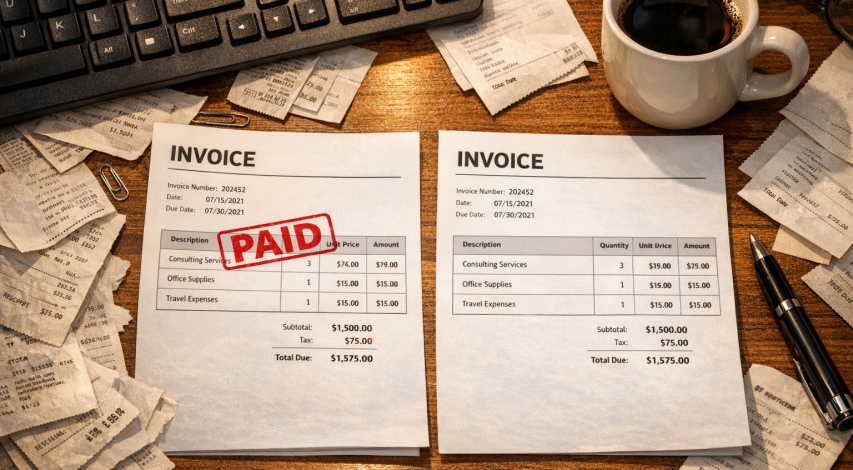
Data entry is actually where most of this starts. Around 92% of duplicate payment errors happen at the data entry or first registration stage, which means a small mistake early on can travel all the way through your approval process undetected. A miskeyed invoice number or a copy-paste slip is usually all it takes.
The table below breaks down the most common types and what tends to cause them.
| Duplicate Charge Type | Common Cause | How Easy to Detect |
|---|---|---|
| Same invoice paid twice | Invoice received through multiple channels | Moderate - only visible with payment history checks |
| Varied invoice numbers, same charge | Vendor resubmission or internal re-entry | Difficult - numbers don't match so systems miss it |
| System-generated duplicate | Processing error or software glitch | Difficult - requires audit trail review |
| Manual data entry error | Keying mistake during invoice registration | Easy if caught early, hard if it moves through approval |
What makes this tough is that each type should have a different strategy to find. A duplicate from a vendor resubmission won't look the same as one from a system error - even if the financial result is identical.
Why Duplicate Charges Happen More Often Than You'd Think
Most duplicate charges don't come from carelessness or bad intentions. They come from the gaps between systems and processes that no one has gotten around to fixing yet.
Manual data entry is one of the biggest contributors. When someone types an invoice number by hand, it's easy to enter it twice under slightly different formats. One record might use dashes, another might not, and the system treats them as two separate invoices; that's all it takes for a payment to go out twice.
Vendor-side errors add another layer to this. A supplier might reissue an invoice after not hearing back, leaving you with two valid-looking documents for the same delivery. If you don't have a tight review process, both can get approved and paid without anyone questioning it.
IBM found that bad data costs U.S. businesses $3.1 trillion every year, and Gartner puts the average per-company loss at $13 million annually. Those numbers make sense when data quality problems go unchecked across an organization. Duplicate charges are one of the most direct ways that data quality translates into actual money leaving the business.
It's worth thinking about where your own process may have a gap. Do invoices get matched against purchase orders before approval? Is there a system check that flags the same dollar amount from the same vendor within a short window? If the answer is no, the conditions for a duplicate charge to slip through are already in place.
Human error and system gaps work together here. A person might see something looks off but assume the system would catch it. The system might flag it but route it to a person who approves it anyway. Neither one is completely at fault, but together they let duplicates move through the process without resistance.
The weaker the controls at each handoff point, the more room there is for charges to repeat without detection.
The Real Financial Hit Duplicate Charges Leave Behind
Even well-run finance teams lose money to duplicate payments. According to APQC, top-performing organizations still see around 0.8% of their disbursements go to duplicate or erroneous payments. For lower performers, that number climbs past 2%. Those percentages sound small until you run the math against actual disbursement volumes.
At different scales, the losses break down as follows.
| Annual Disbursement Volume | Loss at 0.8% (Top Performer) | Loss at 2% (Bottom Performer) |
|---|---|---|
| $1 million | $8,000 | $20,000 |
| $10 million | $80,000 | $200,000 |
| $50 million | $400,000 | $1,000,000 |
| $100 million | $800,000 | $2,000,000 |
That's not a rounding error; it's actual money leaving the business, and a portion of it may never come back. Recovery can depend on how fast you find it and how cooperative the vendor or provider is on the other end.
This problem is not limited to small businesses with loose controls. In 2017, a Massachusetts Medicaid audit uncovered $17.6 million in duplicate and unauthorized billings. A state-level program with compliance requirements and oversight still had this happen at scale; it's the number that reframes what "a few duplicate charges" can mean over time.

There's also a secondary cost that doesn't show up in the numbers. Staff time spent on investigating, disputing, and recovering duplicate payments is time taken away from everything else. Some organizations bring in outside auditors to find what internal teams missed, which can add its own expense on top of the original loss.
The financial damage from duplicate charges is a volume game. The more transactions a business runs, the bigger the exposure grows.
How to Catch Duplicate Charges Before They Clear
The good news is that most duplicate charges are preventable if you have the right checks in place before payment goes out. Catching them early is much easier than recovering the money later.
Accounts payable (AP) automation tools are one of the most helpful ways to do this. These systems can flag possible duplicates by scanning invoice numbers, amounts, vendor names, and dates before anything gets processed. Some AP tools catch as high as 95% of duplicates at this stage, which makes them worth a deeper look if you process a high volume of invoices.
Three-way matching is another strong layer of protection. This process cross-checks a purchase order, a receiving report, and the vendor's invoice to confirm they all line up before payment is approved. If anything doesn't match, the invoice gets held for review. It can add a step, but that step pays off.

Vendor statement reconciliation is also helpful to remember. Comparing what a vendor says you owe against what's in your own records will surface discrepancies that internal checks might miss - especially worth doing with vendors you pay frequently.
Internal approval controls matter too. Requiring a second set of eyes on invoices above a certain dollar amount cuts back on the chance that a duplicate slips through on autopilot. Even a simple sign-off requirement matters. If your current processor makes this harder than it should be, it may be worth exploring merchant processing options with faster approval.
A quick checklist of steps to work into your payment process:
- Use AP automation to scan for duplicate invoice numbers and amounts before processing.
- Apply three-way matching to verify purchase orders, receipts, and invoices align.
- Reconcile vendor statements against your internal records on a set schedule.
- Set approval thresholds so larger payments get reviewed by more than one person.
- Standardise how your team records vendor names and invoice numbers to reduce non-matching account number errors and other data entry mistakes.
These controls work best together instead of in isolation.
Steps to Take When a Duplicate Payment Has Already Gone Out
Finding a confirmed duplicate in your records feels stressful, but it's a fixable problem and most vendors manage these requests all the time. You want to move quickly and calmly through a few simple steps.
Start by pulling the original invoice and the duplicate payment side by side to confirm the amounts, dates and reference numbers match. You don't want to reach out to anyone without that. Screenshot or export records so you have something concrete to share.
Once you have the documentation, contact the vendor. A short email works pretty well here - explain that a payment was sent twice for the same invoice and attach the supporting records. Most vendors will respond with a credit memo or a refund without much pushback, and that's especially the case when you have documentation.
Here is a rough order of steps to follow:
First, confirm the duplicate by comparing payment records against the original invoice. Second, collect supporting documents like bank statements, payment confirmations and the invoice itself. Third, contact the vendor in writing and request a credit or refund. Fourth, log the error in your accounting system and note how it happened. Fifth, flag it internally so your team knows to watch for the same thing.
That last step matters more than you might expect. If the duplicate happened because of a manual data entry error or a missing approval step, it's worth a quick internal note to the right person. You don't need a formal report - just enough to close the loop.
For auditing purposes, keep a record of the original error, your outreach to the vendor and the resolution. If a refund or credit comes through, make sure it gets applied to the right account in your books. A duplicate that gets recovered but recorded incorrectly can create a whole new set of problems in the future.
Stopping the Double-Pay Drain for Good
Here is a short checklist of actions you can take this week to start reducing duplicate charges instantly:

- Standardize vendor naming conventions in your system so the same supplier isn't logged under multiple variations.
- Enable duplicate invoice detection in your accounting or AP software, even if it's just a basic flag on matching amounts and vendor names.
- Require unique invoice numbers for every payment entry and make them a mandatory field.
- Add a secondary review step for invoices above a set dollar threshold before they're approved for payment.
- Run a quick audit of the past 90 days of payments and look for matching amounts, dates, or vendor combinations.
Small process improvements made now can save your organization a real amount over the course of a year. If you've already been billed incorrectly, reviewing how to handle an incorrect transaction amount dispute can help you recover funds. The right habits and steady follow-through are what it takes to fix this. Start with one item on that list and build from there.
FAQs
What is a duplicate charge?
A duplicate charge occurs when the same invoice or transaction is paid more than once, whether due to manual data entry errors, vendor resubmissions, or system glitches.
How common are duplicate payment errors?
Around 92% of duplicate payment errors originate at the data entry stage. Even top-performing organizations see roughly 0.8% of disbursements go to duplicate or erroneous payments.
How can I catch duplicate charges before payment clears?
Use AP automation tools to flag matching invoices, apply three-way matching, reconcile vendor statements regularly, and require secondary approval on high-value invoices.
What should I do after a duplicate payment goes out?
Confirm the duplicate by comparing records, gather supporting documents, then contact the vendor in writing requesting a refund or credit memo. Log the error internally for future reference.
How much can duplicate charges cost a business annually?
At 2% of disbursements, a business processing $10 million annually could lose $200,000 to duplicate payments. Recovery also consumes staff time, adding indirect costs beyond the initial loss.